

Google Analytics and Search Console Mastery: Data-Driven Decision Making for Free
Google Analytics (GA) and Google Search Console (GSC) are free tools that integrate to provide comprehensive SEO and traffic insights, enabling data-driven decisions like optimizing keywords, fixing technical issues, and improving conversions.
Key Benefits and Setup
Both tools are essential for monitoring organic search performance without cost. GSC tracks search queries, impressions, clicks, CTR, and rankings, while GA analyzes user behavior post-click. Linking them merges data for holistic views—e.g., matching high-impression keywords to bounce rates or conversions.
Quick Linking Steps (GA4 Recommended):
- In GA Admin > Product Links > Search Console Links, select Link.
- Choose your GSC property matching the GA web stream.
- Verify both point to the same site for accurate data flow.
Once linked, access GSC data in GA's Search Console menu for queries, clicks, and impressions alongside behavior metrics.
Core GSC Reports for Mastery
Use GSC's Performance tab as your starting point for data-driven insights:
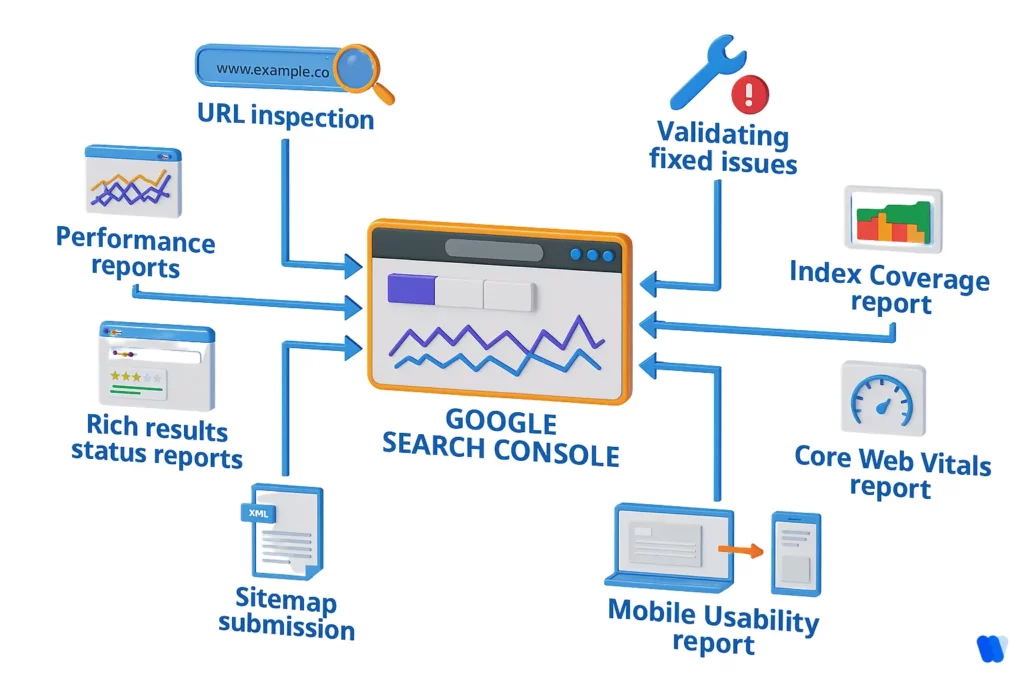
- Metrics: Clicks, impressions, CTR, average position—filter by query, page, country, device, or search appearance.
- Trends: Graphs show clicks/impressions over time; spot seasonal shifts or ranking drops.
- Opportunities: Identify rising keywords, low-CTR pages (optimize titles/descriptions), or content gaps.
Example Analysis:
| Filter | Use Case | Action |
|---|---|---|
| Query | Find high-impression, low-click terms | Update meta titles for better CTR |
| Page | Pinpoint underperforming URLs | Improve content/structure |
| Device/Country | Detect mobile issues or regional trends | Mobile-optimize or localize |
Regularly check Indexing for crawl errors/sitemaps and UX for usability fixes.
Integrating with GA for Deeper Insights
Post-linkage, combine datasets:
- High GSC clicks + high GA bounce rates = Refine landing pages (e.g., content gaps).
- Compare organic keywords vs. paid for budget optimization (conversions, CAC).
- Track full journeys: Search entry → engagement → conversions.
Pro Tip: Use GA4's integrated reports for search traffic visualization; export to dashboards for ROI analysis.
Advanced Free Mastery Techniques
- API Automation: Pull GSC data programmatically for custom tracking (rankings, errors, analytics). Ideal for daily keyword monitoring or trend spotting.
- Filters & Comparisons: Compare date ranges in GSC to measure post-optimization impact.
- Third-Party Free Ties: Import GSC keywords to tools like Semrush (free tier) for competitor benchmarks.
- SEO Workflow: Submit sitemaps, fix errors, optimize for high-potential queries weekly.
Actionable Decision Framework
- Monitor: Weekly Performance review—focus top queries/pages.
- Diagnose: Link GA data to spot disconnects (e.g., traffic ≠ conversions).
- Optimize: Target 10-20% CTR lifts via meta tweaks; recheck in 2 weeks.
- Scale: Automate via API for patterns like seasonal keywords.
This free combo empowers precise, evidence-based SEO without paid tools—start by verifying your GSC property at search.google.com/search-console.















WebSeoSG offers the highest quality website traffic services in Singapore. We provide a variety of traffic services for our clients, including website traffic, desktop traffic, mobile traffic, Google traffic, search traffic, eCommerce traffic, YouTube traffic, and TikTok traffic. Our website boasts a 100% customer satisfaction rate, so you can confidently purchase large amounts of SEO traffic online. For just 40 SGD per month, you can immediately increase website traffic, improve SEO performance, and boost sales!
Having trouble choosing a traffic package? Contact us, and our staff will assist you.
Free consultation