

Yes — a website can show signs that it’s been shadow banned (i.e., quietly demoted or suppressed in Google search) even if you’ve received no manual action notice. Below are the common traffic, indexing, and ranking red flags to watch for, how to check each one, likely causes, and immediate diagnostic steps you can take to confirm and begin recovery.
Key red flags (what to look for and how to check)
- Sudden, sustained drop in impressions and clicks for pages that previously ranked well: Check Google Search Console (GSC) “Performance” for abrupt falls in Impressions/Clicks for specific pages or query groups while overall site settings remain unchanged; a sharp decline without a manual action notice is a primary signal people describe as a shadow ban.
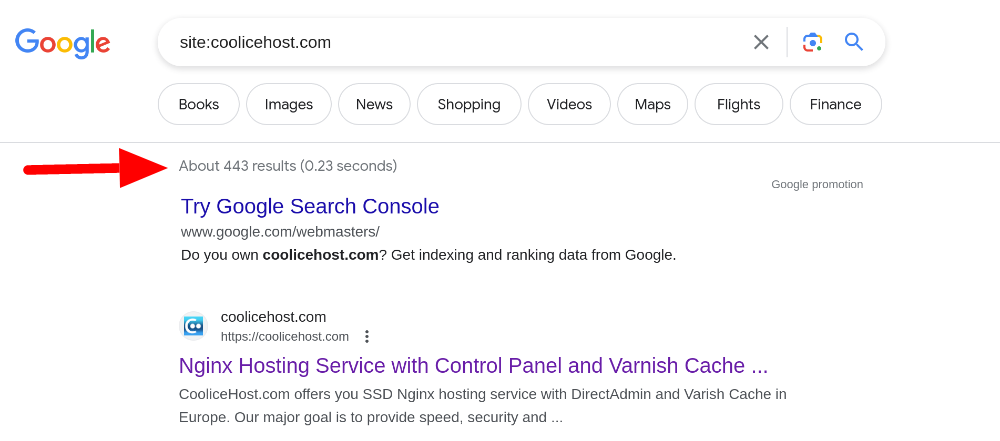
- Pages still indexed but not ranking for target queries: If URLs appear in Google’s index (site:example.com or GSC URL inspection shows “URL is on Google”) but no longer rank for keywords they used to, that indicates demotion rather than deindexing.
- Crawl activity or indexing drops without site changes: A sudden fall in crawl rate or “Discovered — currently not indexed” spikes in GSC can indicate Google is de-prioritising parts of the site.
- Traffic collapse restricted to organic search (not paid, direct, or referrals): Use analytics to segment traffic channels; a decline specific to organic search while other channels hold steady suggests search visibility problems rather than overall demand loss.
- Loss of impressions/clicks concentrated on specific content types or sections: If entire templates, categories or mass-generated pages lose visibility simultaneously, templated/low-value pages may be devalued.
- Rankings appear for branded queries only (non-branded suppressed): If brand-name searches still find you but competitive or informational keywords don’t, that can indicate demotion for broader queries.
- No manual action or security warnings reported in GSC: Shadowing is typically a stealthy demotion without explicit penalty messages, so absence of a manual action is consistent with shadow-banning-like demotion.
- Reduced presence in SERP features where you previously appeared: Sudden disappearance from featured snippets, knowledge panels, or rich results for queries you previously occupied can accompany demotion.
- Mismatch between internal site quality metrics and external visibility: High-quality traffic signals on-site (time on page, conversions) but no organic impressions may point to indexing or algorithmic suppression rather than content irrelevance.
Common causes and signals to differentiate them
- Algorithmic quality demotion (Google core/quality systems): Google can quietly devalue content it deems low-quality, thin, duplicate, or overly templated; mass-generated or near-duplicate pages are frequent triggers.
- Spammy or manipulative signals: Link schemes, aggressive internal cross-linking, unnatural anchor patterns, cloaking, excessive doorway pages or automated content can cause algorithmic suppression even without a manual action.
- Technical indexing/crawling issues: Noindex tags, robots.txt blocks, canonical errors, blocked resources, pagination mishandling or server errors can make pages non-indexable or not surfaced even when they exist.
- Site-wide structural problems after migrations or CMS changes: Large URL changes, missing redirects or duplicate content created by templates/parameters often coincide with sudden visibility loss.
- Algorithm change or re-weighting: Ranking fluctuations after a Google update can look like a shadow ban if previously ranking pages are devalued; check timing against known updates.
- False positives from analytics or data sampling: Ensure the impression/click drop is real (compare GSC, GA4/UA and server logs) before assuming demotion.
How to verify (step-by-step diagnostics)
- Confirm the drop and scope in GSC: Compare Impressions/Clicks by page, query and date range to identify exact pages/queries affected and when the drop began; absence of a manual action does not rule out algorithmic demotion.
- Check indexing status for sample URLs: Use GSC URL Inspection and site: query to confirm whether affected URLs are indexed and whether Google’s live test renders them correctly.
- Compare channels and logs: Verify organic-only decline in analytics and cross-check server logs for crawl frequency declines or spike in crawl errors.
- Inspect robots/meta and canonical tags: Ensure pages aren’t accidentally noindexed, blocked by robots.txt, or canonicalised to irrelevant URLs.
- Audit content quality and uniqueness: For templates, category pages or large-scale generated pages, check for thin/duplicate content and create unique, high-value copy where needed.
- Review backlinks and manual actions: Check GSC for security/manual action messages and review backlink profile for spammy links that could trigger algorithmic actions.
- Check recent changes and updates: Correlate visibility loss with site deployments, migrations, or known Google algorithm updates.
- Test visibility externally: Search from different locations or use SERP-rank trackers; verify content appears under the keywords you expect and check whether posts appear under hashtags/aggregations on other platforms to rule out non-Google suppression patterns.
Immediate remediation steps (what to do first)
- Run a focused technical and content audit on affected sections (robots, meta tags, canonical, pagination, redirects, duplicate pages).
- Improve or remove thin or templated pages: consolidate similar content, add unique value, or use noindex for low-value pages to prevent site-level devaluation.
- Fix technical issues found (server errors, blocked assets, broken internal linking) and resubmit affected pages or sitemap in GSC for re-crawl.
- Clean obvious spammy signals: remove or disavow toxic backlinks only if there’s evidence of spam link building, and stop any automated behaviour that mimics bots.
- Monitor GSC and analytics daily after fixes; watch for recovery in impressions/clicks over weeks (algorithmic recovery can be gradual).
- If you suspect a manual action (rare with shadow-banning-like demotion), GSC will show a notice—if so, follow the remediation steps and file a reconsideration request.
When to escalate or get expert help
- Large-scale template or migration issues, complex crawl/index problems, or if you cannot find technical or content causes — engage an SEO specialist or reputable agency for a full site forensic audit.
- If you’ve exhausted diagnostics and fixes but visibility remains suppressed, consider professional help to run deeper log analysis, link audits and content strategy changes.
What to expect about timeline and likelihood of recovery
- If suppression is algorithmic due to quality, recovery typically requires improving content quality and site architecture, and can take weeks to months as Google re-crawls and reassesses pages.
- If the issue is technical (e.g., accidental noindex or robots block), recovery can be fast once fixed and re-crawled.
- There is no official “shadow ban” status from Google; the effect you’re seeing is usually an algorithmic devaluation or indexing issue rather than a named penalty.
Quick checklist you can run in one day
- GSC: compare performance by page/query and check Manual Actions and Coverage reports.
- URL Inspection: test a handful of affected pages for indexing and live render.
- Robots/meta/canonical: scan top affected URLs for noindex/robots/canonical mistakes.
- Analytics: confirm organic-only traffic drop and timeframe.
- Recent changes: check deployments, migrations, or mass content generation in timeframe of the drop.
- Backup: prepare to roll back recent changes if you find a clear correlation.
If you’d like, I can:
- Walk through a tailored checklist for your site (list of GSC/analytics queries to run).
- Help interpret specific GSC reports or sample URLs (you can paste non-sensitive output or descriptions).
- Recommend an audit plan or tools to run automated scans (for crawl, duplicate content, and backlink quality).
Sources: Descriptions and signals above are based on SEO practitioner guidance and community reporting about algorithmic demotion and stealthy visibility loss, including diagnostic advice to check GSC for sudden drops in impressions/clicks, indexation checks, and content/technical audits.













WebSeoSG offers the highest quality website traffic services in Singapore. We provide a variety of traffic services for our clients, including website traffic, desktop traffic, mobile traffic, Google traffic, search traffic, eCommerce traffic, YouTube traffic, and TikTok traffic. Our website boasts a 100% customer satisfaction rate, so you can confidently purchase large amounts of SEO traffic online. For just 40 SGD per month, you can immediately increase website traffic, improve SEO performance, and boost sales!
Having trouble choosing a traffic package? Contact us, and our staff will assist you.
Free consultation