

Prerequisites for Integration
To integrate Google Analytics 4 (GA4) with Google Tag Manager (GTM) on a news website, first ensure you have:
- A GA4 account and property with a web data stream created.
- A GTM account and web container set up.
- Access to edit your website's code (e.g., via CMS like WordPress or custom HTML for news sites).
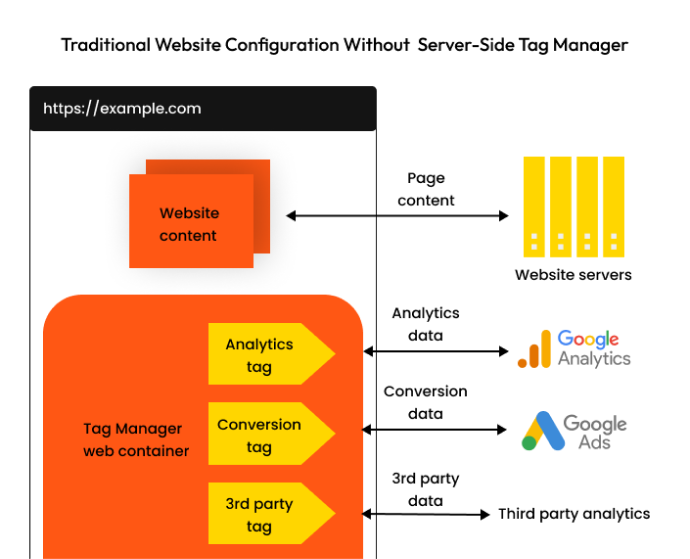
GTM simplifies deployment by managing GA4 tags centrally, enabling page views, custom events (e.g., article reads, scroll depth), and privacy controls without direct code changes.
Step-by-Step Setup
Follow these steps, adapted for news websites where performance and user privacy are key.
-
Create or Access GTM Account and Container
Sign in at tagmanager.google.com. If new, click Start for free, enter account name (e.g., "NewsSite Analytics"), select country, and create a Web container.
Copy the GTM container snippet (two code parts: one in<head>, one before</body>). Paste into your news site's HTML template. -
Obtain GA4 Measurement ID
In GA4, go to Admin > Data Streams > your web stream > find Measurement ID (format: G-XXXXXXXXXX). -
Create Google Tag in GTM
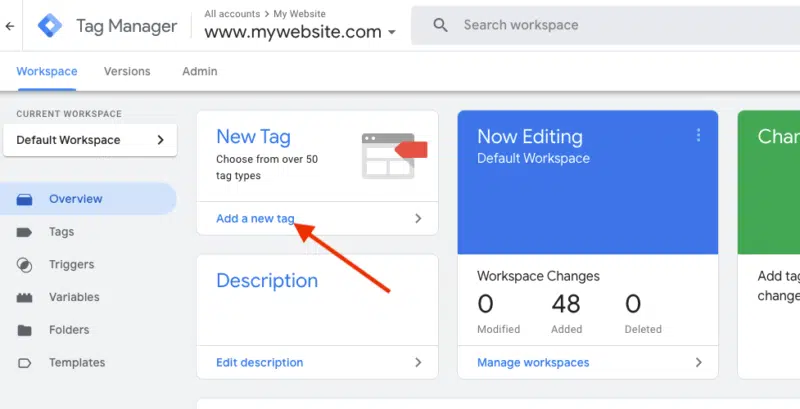
- In GTM workspace, click Tags > New.
- Name it (e.g., "GA4 - Google Tag").
- Select Tag Configuration > Google tag.
- Enter your Measurement ID as Tag ID.
- For optional settings: Enable enhanced measurement for automatic events like page views, scrolls (useful for news article engagement).
- Trigger: Select All Pages (fires on every page load).
-
Add Custom Events for News Sites (Optional but Recommended)
Use GTM triggers for news-specific tracking:- Article views: Trigger on URL changes or data layer pushes (e.g.,
dataLayer.push({'event': 'article_view', 'article_title': 'Headline'});). - Scroll depth: Create a custom trigger for 25%/50%/75% scrolled.
- Set up GA4 Event tags linked to these triggers.
- Article views: Trigger on URL changes or data layer pushes (e.g.,
-
Implement Privacy and Consent
- Default to no consent; use consent mode for categories like analytics/marketing.
- Integrate with CMP (e.g., via GTM variables for user consent).
- For news sites, ensure GDPR/CCPA compliance with data retention settings.
-
Deploy GTM Snippet to Website
Add the GTM<script>to all pages (head and body). For CMS:- WordPress: Use plugins like "Insert Headers and Footers".
- Custom news CMS: Edit site-wide templates.
Verification and Publishing
- Preview Mode: In GTM, click Preview, enter your site URL, and check Tag Assistant for GA4 calls to
google-analytics.comand GTM loads. - Verify real-time data in GA4 reports (e.g., page views).
- Publish: Click Submit > Publish in GTM. Data starts flowing immediately; historical data unaffected.
News Website Considerations
- Performance: Use phased loading—critical GA4 first, then marketing tags—to minimize load times on high-traffic article pages.
- Data Layer: Push news events (e.g., time on page, shares) via
dataLayerfor reliable tracking. - Common pitfalls: Duplicate trackers (remove old GA code), incorrect triggers, or unapproved publishes. Test across devices.
This setup provides comprehensive tracking like user engagement on articles while prioritizing speed and privacy. For CMS-specific tweaks (e.g., AEM or WordPress), refer to platform guides.















WebSeoSG offers the highest quality website traffic services in Singapore. We provide a variety of traffic services for our clients, including website traffic, desktop traffic, mobile traffic, Google traffic, search traffic, eCommerce traffic, YouTube traffic, and TikTok traffic. Our website boasts a 100% customer satisfaction rate, so you can confidently purchase large amounts of SEO traffic online. For just 40 SGD per month, you can immediately increase website traffic, improve SEO performance, and boost sales!
Having trouble choosing a traffic package? Contact us, and our staff will assist you.
Free consultation