

You can track referral traffic and conversions from guest posts in GA4 by (1) making sure those visits are classified as referral traffic and (2) tying that traffic to key events / conversions using standard reports or Explorations.
Below is a practical, minimal setup you can follow.
1. Make sure guest post traffic is trackable
You have two main options:
-
Simple (no UTMs):
Let GA4 record the domain of the site where your guest post is published as referral traffic.
This works if you only need data per domain (e.g.exampleblog.com). -
More precise (recommended): use UTM tags:
Add UTM parameters to links in your author bio / CTAs, for example:utm_source=guestpost_blognameutm_medium=referralutm_campaign=guestpost_topic_or_site
This lets you distinguish:
- Traffic from different guest posts on the same site
- Guest posts vs other “organic” referrals from that site
2. Find referral traffic from guest posts (standard GA4 reports)
-
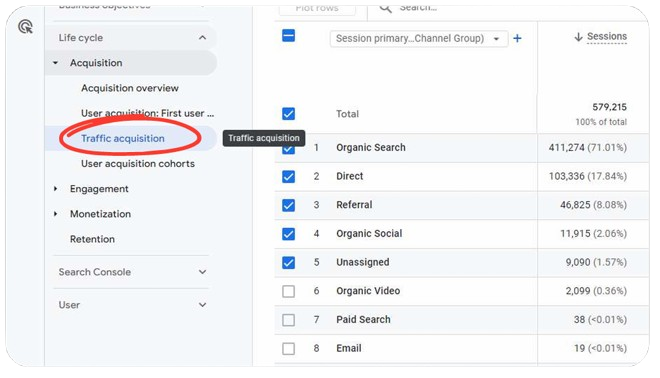
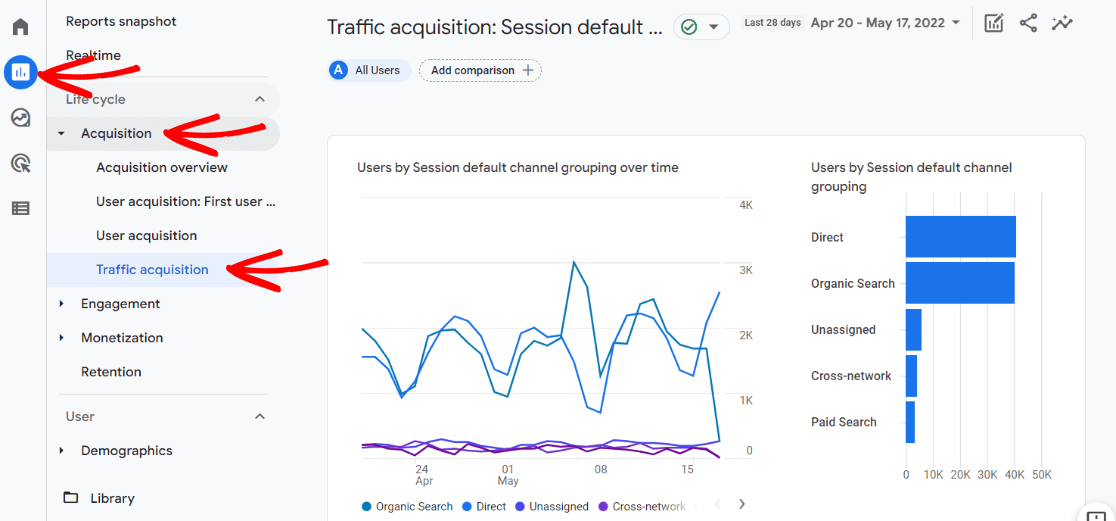
Go to Reports → Acquisition → Traffic acquisition.
-
Add a filter:
Session default channel groupequals Referral.
-
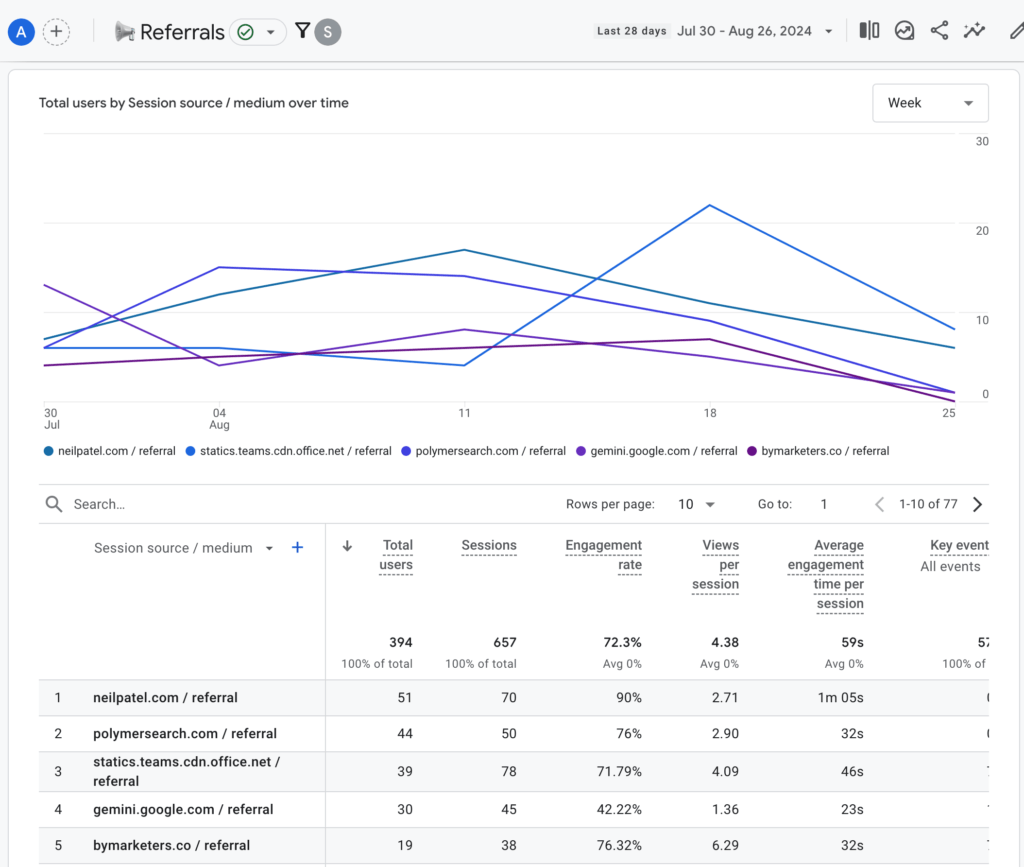
To see specific sites:
- Use primary dimension =
Session source / mediumor add it via the blue + icon and choose Traffic source → Session source / medium. - This shows which domains send referral traffic (e.g. the blogs where your guest posts live).
- Use primary dimension =
-
To see which landing pages your guest posts are sending people to:
- While still filtered to channel = Referral, click the blue + icon.
- Choose Page / screen → Landing page + query string.
- Now the table shows: referrer domain + landing page, useful if different guest posts drive traffic to different pages.
Note: GA4 only stores the referrer domain, not the full referring URL, so you will not see the exact guest post URL unless you encode it in UTMs or query parameters.
3. Tie guest-post referral traffic to conversions / key events
GA4 renamed “conversions” to key events.
- First, ensure your desired actions (e.g. form submit, signup, purchase) are tracked as key events.
- In Traffic acquisition:
- Add metric Session key event rate to see the % of sessions that converted for each referrer.
- You can also use metrics like Key events and Total revenue (if set up).
This lets you see, per referring site:
- Sessions from guest posts
- Session key event rate (conversion rate)
- Key events / revenue generated
If you used UTM parameters, switch primary dimension to Session source / medium or Session campaign to evaluate performance per guest post / campaign rather than just per domain.
4. Build a focused “Guest Posts” report (optional but useful)
To avoid setting filters every time, you can create a custom report:
- Go to Explore and create a Free form exploration.
- Add dimensions such as:
Session source / mediumSession campaign(if using UTMs)Landing page + query string
- Add metrics:
SessionsUsersKey eventsSession key event rate
- Apply a filter:
- Include only
Session sourceorSession campaignthat match your guest-post naming convention (e.g. containsguestpost_).
- Include only
This gives you a reusable “Guest Post Performance” dashboard: traffic, conversions, and conversion rate per guest post.
5. Practical conventions to make analysis easy
- Use a consistent UTM naming scheme, for example:
utm_source=guestpost_sitenameutm_medium=referralutm_campaign=guestpost_topic
- Always send guest-post traffic to dedicated landing pages when possible; this makes landing-page + referrer analysis much clearer.
If you tell me your current GA4 setup (e.g. what conversions you track and whether you are already using UTMs), I can outline the exact filters/dimensions you should apply with your naming.














WebSeoSG offers the highest quality website traffic services in Singapore. We provide a variety of traffic services for our clients, including website traffic, desktop traffic, mobile traffic, Google traffic, search traffic, eCommerce traffic, YouTube traffic, and TikTok traffic. Our website boasts a 100% customer satisfaction rate, so you can confidently purchase large amounts of SEO traffic online. For just 40 SGD per month, you can immediately increase website traffic, improve SEO performance, and boost sales!
Having trouble choosing a traffic package? Contact us, and our staff will assist you.
Free consultation