

Negative keywords are a fundamental strategy for optimising Google Ads campaigns by preventing your ads from appearing in irrelevant searches. They work as a direct command to Google, telling the platform "don't show my ad if this term is part of the search." By strategically excluding certain search terms, you can significantly improve campaign efficiency, reduce wasted ad spend, and focus your budget on high-intent prospects.
Understanding Negative Keywords
What They Are
A negative keyword is a type of keyword that prevents your ad from being triggered by a certain word or phrase. When you add a negative keyword to your campaign, your ads won't be shown to anyone searching for that term or closely related variations, depending on the match type you select. For example, if you sell luxury watches and add "cheap" as a negative keyword, your ad won't appear when users search for "cheap watches," preventing wasted clicks from price-conscious shoppers.
How They Work
Negative keywords act as gatekeepers for your ad campaigns, refining your targeting to ensure ads reach only the most relevant audience. Rather than bidding on keywords to show your ads, negative keywords exclude specific search terms from triggering your advertisements, allowing you to focus resources on qualified prospects.
Key Benefits for Campaign Efficiency
Reduced Wasted Ad Spend
The most immediate benefit of using negative keywords is eliminating clicks from users who have no intention of converting. For instance, an online luxury watch retailer might receive clicks from users searching for "watch batteries" or "watch straps"—neither of which are core offerings. By adding "battery" and "strap" as negative keywords, the business directs funds more efficiently toward prospects genuinely interested in purchasing luxury timepieces.
Improved Click-Through Rate and Conversion Rate
Negative keywords help improve your click-through rate (CTR) by ensuring only relevant searchers see your ads. When your ad is displayed to users more likely to be interested in your offer, the chances of them clicking and converting increase significantly. This leads to higher conversion rates and better overall campaign performance.
Enhanced Ad Relevance and Quality Score
By excluding irrelevant searches, your ads become more targeted, leading to higher CTRs and improved ad relevance. This can positively impact your Quality Score, resulting in better ad positions and lower cost-per-click (CPC). Better ad relevance signals to Google that your campaign is well-structured and user-focused.
Maximised Return on Ad Spend (ROAS)
Using negative keywords ensures that advertising expenditure is focused on the right people and in the right places, improving your ROAS. This targeted approach reduces the proportion of unqualified clicks while increasing high-quality, relevant user interactions.
Negative Keyword Match Types
Different match types offer varying levels of control over which searches trigger your ads:
Broad Match Negative Keywords
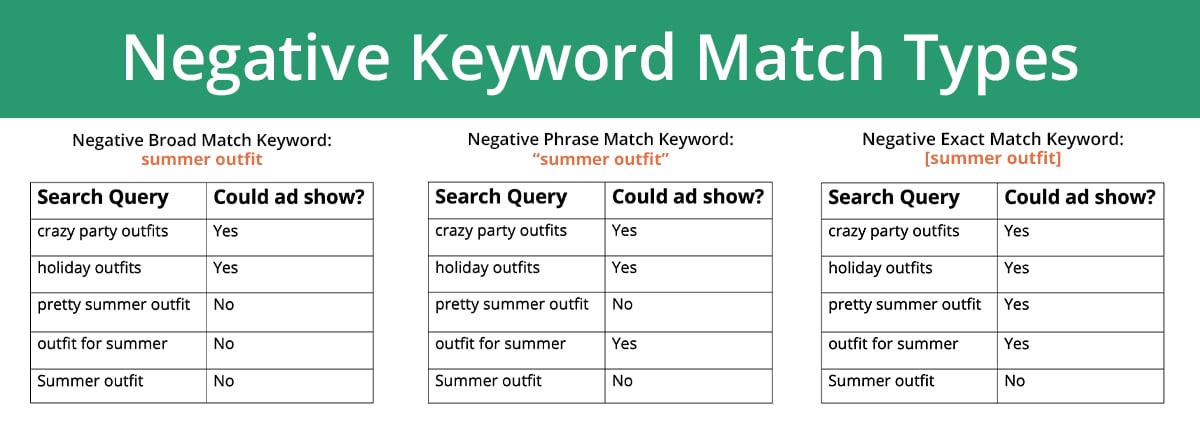
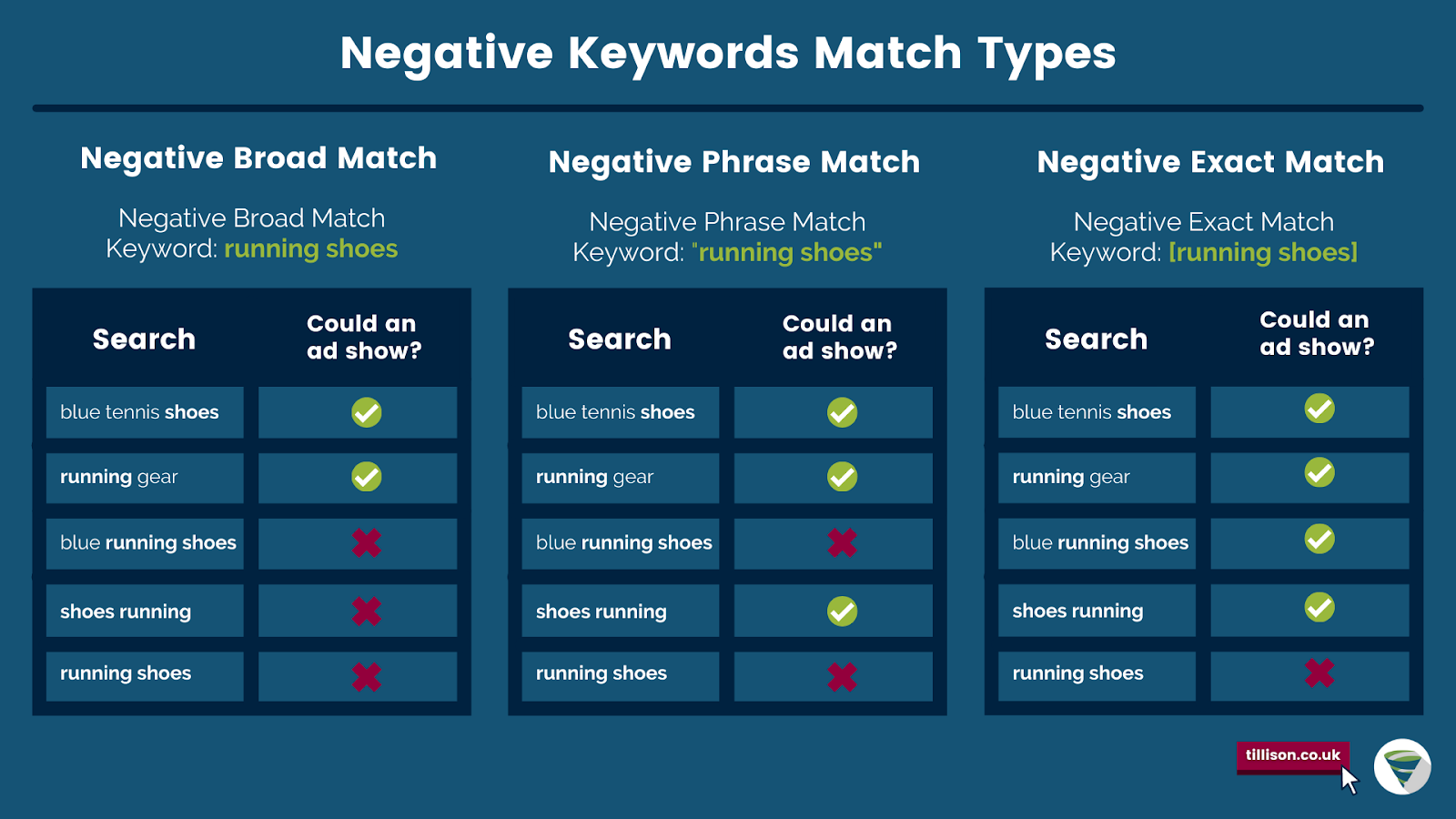
Broad match negative keywords block ads from appearing in searches containing all negative keyword terms in any order. However, they allow ads to show for queries containing only part of the negative keyword or additional unrelated terms. For example, if your negative keyword is "free courses," searches like "free online courses" and "courses for free in 2024" would be blocked, but "online courses" and "best programming courses" would still show your ads.
Phrase Match Negative Keywords
Phrase match negative keywords exclude your ad from people searching for the exact keyword phrase with additional words before or after it. If your negative phrase match keyword is "full body massage," your ad won't show for searches like "full body massages near me" or "deep tissue full body massage," but could still appear for "facial and back massage" or "shoulder massage."
Exact Match Negative Keywords
Negative exact match keywords prevent your ads from appearing if the search contains the exact keyword term with no variations. However, your ad may still appear if it includes the keyword term with additional words. For example, if your negative exact keyword is "beach holidays," your ad will be excluded from the search "beach holidays" but could still show for "beach holidays in Europe."
Strategic Implementation Approaches
Account-Level vs Campaign-Level Negatives
Account-level negative keywords apply across every campaign you run and are perfect for universal terms that will never bring in qualified leads, regardless of the campaign. Common account-level examples include "jobs/careers" (blocks employment-related searches), "DIY/tutorial/training" (filters out users who want to learn instead of buy), and "free" (universally cuts out low-intent searches).
Campaign or ad group-level negatives provide more granular control, allowing you to exclude terms specific to particular campaigns or ad groups based on their unique objectives.
Building Your Negative Keyword List
Start broad and refine over time by beginning with a focused negative keyword list based on obvious exclusions. Then gradually refine the list using data from search term reports to identify patterns in irrelevant clicks. Review the search terms that triggered your ads, highlight terms that don't match your products, services, or audience intent, and add these terms as negative keywords to prevent future irrelevant impressions.
Scenario-Based Strategies
Different business models benefit from tailored negative keyword strategies:
| Scenario | Negative Keyword Strategy | Expected Outcome |
|---|---|---|
| Selling Premium Products | Use "cheap", "bargain", "discount" | Focus on high-intent, premium customers |
| Local Business | Exclude terms like "online" or names of other locations | Attract local customers, reducing wasted clicks |
| Specialized Service Provider | Exclude unrelated services (e.g., "repair" if only selling new items) | Ensure ads reach the most relevant audience |
Implementation Best Practices
To add negative keywords to your Google Ads account, locate the 'Negative Keywords' section under 'Keywords' on the left-hand panel, then click the blue '+' button where you'll be able to add the negative keywords to a list and choose to add them at either a campaign or ad group level. Ensure you write the keywords in the correct format depending on the keyword match type—for example, [exact match], "phrase match", or broad match.
Use phrase and exact match types strategically to ensure you only exclude specific irrelevant terms while keeping broader queries intact to capture potentially valuable traffic. Regular updates to your negative keyword lists ensure you're spending your Google Ads budget more efficiently, improving overall campaign performance and ROI.
By implementing a comprehensive negative keyword strategy, you transform your Google Ads campaigns from broad, inefficient operations into finely-tuned machines that deliver qualified traffic and maximise your advertising investment.













WebSeoSG offers the highest quality website traffic services in Singapore. We provide a variety of traffic services for our clients, including website traffic, desktop traffic, mobile traffic, Google traffic, search traffic, eCommerce traffic, YouTube traffic, and TikTok traffic. Our website boasts a 100% customer satisfaction rate, so you can confidently purchase large amounts of SEO traffic online. For just 40 SGD per month, you can immediately increase website traffic, improve SEO performance, and boost sales!
Having trouble choosing a traffic package? Contact us, and our staff will assist you.
Free consultation